
In the inventors section you will be asked to provide the names and contact details of co-inventors (both Kent State and non-KSU contributors) as well as the percentage of their contribution. To add an inventor click “Add Inventor” above the table.
You will be prompted to look up the inventor by name or email. Use the search box in the upper right-hand corner of the window to search for your inventor. If you do not see them, click “Add a new contact” and fill out their name and contact information.Click on the "Search" button.
Navigate the list to find the inventor and select "Choose". After that, select the department by clicking on the more "..." button, enter the department name, click on the "Search" button, select the option from the list and hit "Save Changes".
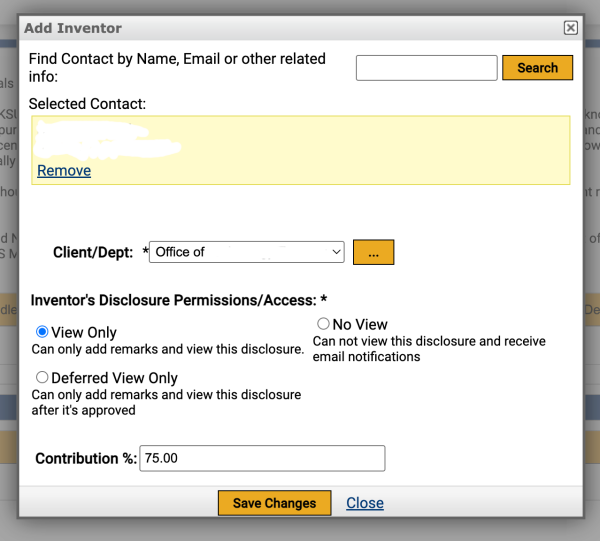
Once added adjust the contribution levels of each row so the total contribution from KSU inventors adds to 100%.
All external contributors should list 0% for their KSU contribution as this % is used only for internal KSU purposes. An agreement related to revenue distribution outside of KSU may be drafted at a later date.

