Printing Instruction
Instructions for Poster Printing
- Be sure to create your poster using PowerPoint. Here is a link to some templates.
If using a template, do NOT adjust the size of the posters. Leave it set to 36 inches x 42 inches.
- The posters are being printed by the IRC (Instructional Resource Center) and we will be charged by the linear foot. So, leaving the size of the poster as it is set is imperative for cost purposes!
- You are welcome to change the color scheme and organization of the poster template to suit your needs.
- If you are using your own template, be sure to set the dimensions of the PowerPoint as follows:
- Save the file as a PowerPoint (.pptx) file.
- Send the file to both Mary Russell (mrussel1@kent.edu) AND Niza Licuanan (mlicuana@kent.edu)
- We will confirm the post is the correct size, the file is in the correct format and submit it to the IRC for printing.
- If not, we will send it back to be corrected.
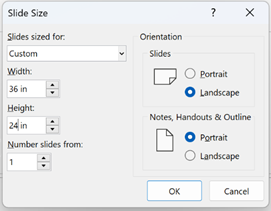
- The IRC can rotate the poster to print it, but at least one side must be 36 inches or less.
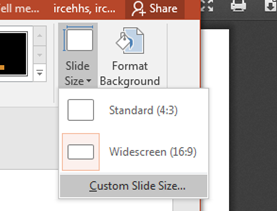
- To set the dimensions of your PowerPoint, click the “design” tab, and select “slide size” on the right.
- Select “custom slide size” from the drop-down menu.
- Change the dimensions of the slide. Whatever dimensions you choose will reflect the actual size of the poster.
- Set the dimensions BEFORE creating the slide’s design, so that the size change will not affect your poster.
- Create your slide and ensure the sizing and formatting is right, as the IRC will not format any documents.